Intel SGX for dummies
This is part of the TEEs for dummies series. Here we set up Intel Software Guard Extensions (SGX) and run a first enclave with the Intel SGX SDK.
Intel SGX is a TEE technology which enables applications to create secure encrypted memory regions called enclaves. Enclave memory is inaccessible to privileged software like the OS or hypervisor and can only be decrypted inside the CPU.
At boot time, the BIOS/firmware allocates a portion of DRAM called processor reserved memory (PRM) to be used by SGX. PRM pages are encrypted with a key only known to the CPU. Most of the PRM comprises the enclave page cache (EPC), which is DRAM used by SGX enclaves at runtime. When an application creates an SGX enclave, part of its virtual address space (the enclave) is mapped to this encrypted DRAM region.
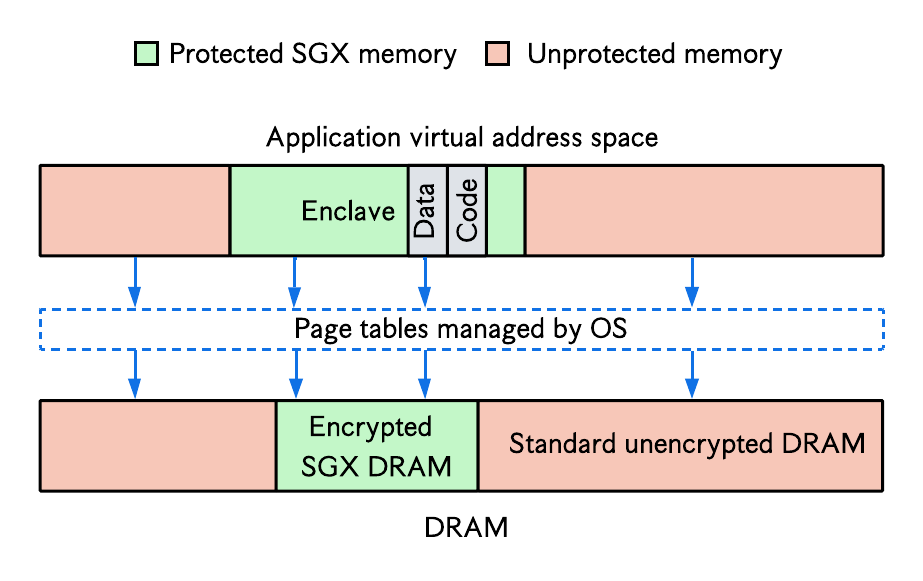
The pages are transparently decrypted1 by an extension of the memory controller called the memory encryption engine (MEE) when they are copied into CPU cache lines. The page tables are still managed by the OS, but the latter cannot access any page in enclave memory. The CPU also performs access-control checks to ensure one enclave does not access the memory of another enclave.
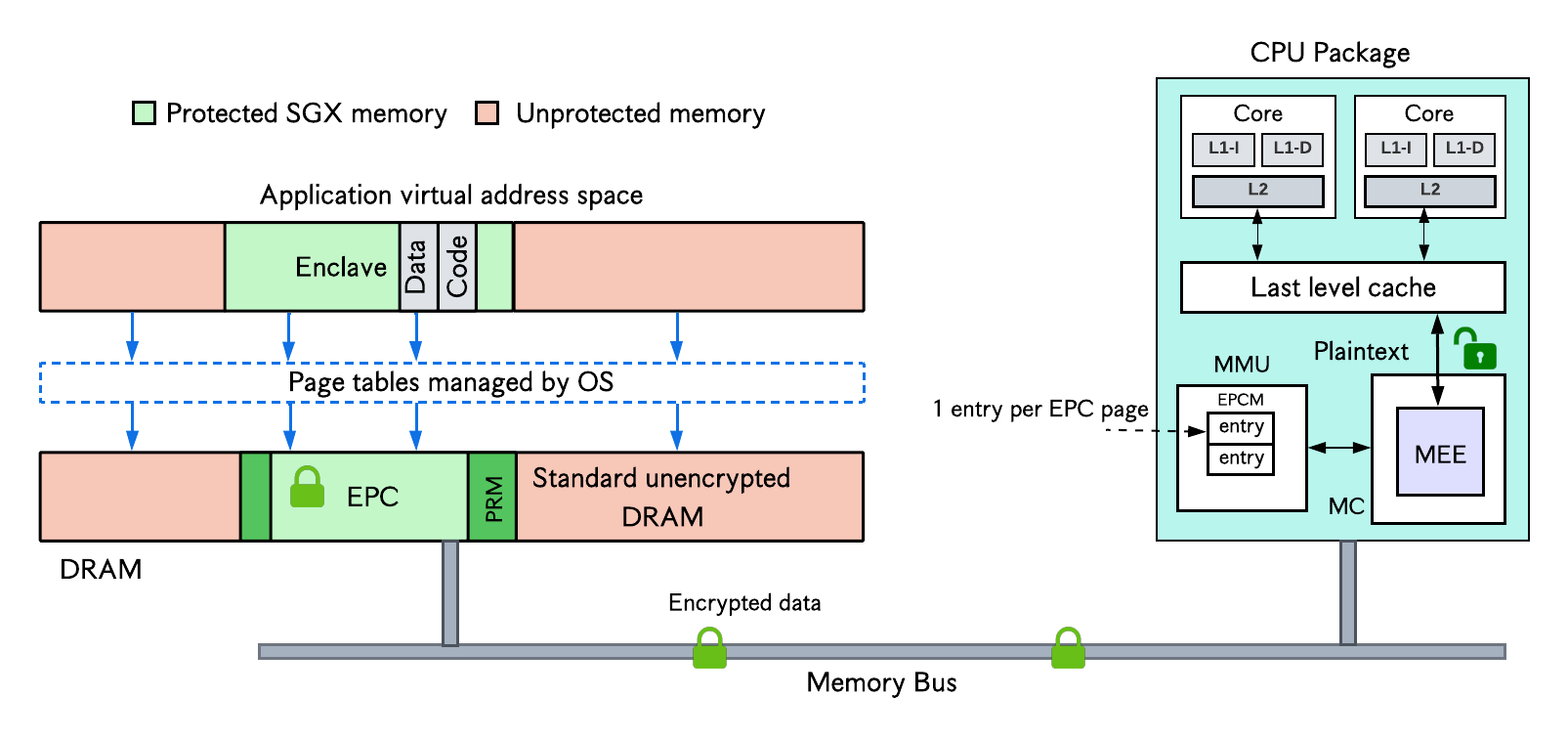
A microarchitectural structure called the enclave page cache map (EPCM) tracks each EPC page in an EPCM entry which describes the owning enclave, access rights, page type, and so on.
In a production setting, remote attestation is used to authenticate the hardware (i.e., verify it actually supports SGX) and ensure enclave code has not been tampered with.
System setup
Hardware verification
This GitHub page provides a list of CPUs and servers with Intel SGX support. On Linux, you can verify SGX capability by building and running the test-sgx.c program from that repo:
1
2
3
git clone https://github.com/ayeks/SGX-hardware.git && cd SGX-hardware
gcc -Wl,--no-as-needed -Wall -Wextra -Wpedantic -masm=intel -o test-sgx -lcap cpuid.c rdmsr.c xsave.c vdso.c test-sgx.c
./test-sgx
You should see ...Supports SGX in the result if your server supports SGX. If you do not have SGX support, you can still install SGX software (but no SGX driver) and run applications in SGX simulation mode.2
SGX software installation
To develop and run applications in an SGX TEE, you need three pieces of software:
- The Intel SGX SDK
- The Intel SGX platform software (PSW)
- The Intel SGX driver
You can either build these packages from source (see Intel SGX GitHub) or use prebuilt binaries. Since we are dummies, we will go for the prebuilt binaries.
Releases live here. For now we focus on the links called “Intel(R) SGX Installers …”, which contain the SDK, PSW, and driver. The “DCAP Installers” are used for attestation, which we do not need yet. For Ubuntu 24.04, use this link.
Install packages required by SGX software:
1
2
sudo apt-get install build-essential ocaml automake autoconf libtool wget python3 libssl-dev dkms
sudo update-alternatives --install /usr/bin/python python /usr/bin/python3 1
SGX driver installation
Mainline kernel 5.11 or higher includes an in-kernel SGX driver: /dev/{sgx_enclave, sgx_provision}. Verify it with ls -la /dev/sgx*. If your kernel does not include the in-kernel driver, download and install the driver for your Ubuntu release. For Ubuntu 24.04:
1
2
3
wget https://download.01.org/intel-sgx/sgx-linux/2.26/distro/ubuntu24.04-server/sgx_linux_x64_driver_1.41.bin
chmod 777 sgx_linux_x64_driver_${version}.bin  # make the installer executable
sudo ./sgx_linux_x64_driver_${version}.bin     # run the installer
SGX PSW installation
The PSW is a runtime software stack that supports execution of SGX applications. For example, it handles enclave creation, SGX context switches, and attestation services.
- Point apt at Intel’s prebuilt PSW packages:
1
2
# For Ubuntu 24.04; see the SGX installation guide for other OS versions
echo 'deb [trusted=yes arch=amd64] https://download.01.org/intel-sgx/sgx_repo/ubuntu noble main' | sudo tee /etc/apt/sources.list.d/intel-sgx.list
- Install packages:
1
2
sudo apt-get update
sudo apt-get install libsgx-epid libsgx-quote-ex libsgx-dcap-ql
SGX SDK installation
The SDK provides a framework for building SGX-based applications. Download and install the prebuilt package as follows:
1
2
3
4
wget https://download.01.org/intel-sgx/sgx-linux/2.26/distro/ubuntu24.04-server/sgx_linux_x64_sdk_2.26.100.0.bin
chmod +x sgx_linux_x64_sdk_2.26.100.0.bin
sudo ./sgx_linux_x64_sdk_2.26.100.0.bin
# Specify /opt/intel as the install directory
For further instructions, see the Intel SGX SW Installation Guide for Linux.
Testing simple SGX applications
The SGX SDK provides sample applications in its installation directory. If you installed the SDK in /opt/intel, the sample code folder should be in /opt/intel/sgxsdk/SampleCode. Copy this folder to your working directory:
1
2
sudo cp -rf /opt/intel/sgxsdk/SampleCode .
sudo chown -R $USER:$USER SampleCode  # fixes permission issues
Build and run a simple SGX program like SampleEnclave:
1
2
3
cd SampleCode/SampleEnclave
make
./app  # or sudo ./app
The result Sample Enclave successfully returned indicates your SGX program ran successfully.
Developing SGX applications with the SDK
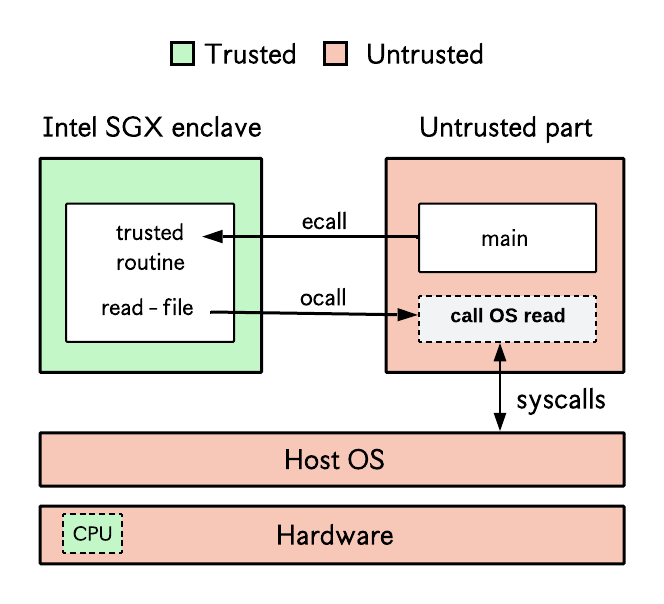
The SGX SDK requires that developers partition their applications into a trusted part which executes in the enclave (i.e., the TEE) and an untrusted part which executes out of the TEE, like a regular application. Each sample application provided by the SDK is structured this way: the App folder contains all code for the untrusted side, while the Enclave folder contains all code for the trusted side.
The SDK provides mechanisms to context-switch between both parts at runtime:
ocallsallow a thread in enclave mode to switch out of enclave mode, e.g., to perform a system call likereadorwriteecallsallow a thread in non-enclave mode to switch into enclave mode
Library operating systems and WebAssembly
Manually partitioning code into trusted and untrusted parts following the SGX SDK design can be complex. Library OSes such as Gramine and Occlum let unmodified applications run in SGX enclaves. Another approach is to run a WebAssembly runtime inside the enclave.
Other resources
- Quarkslab’s blog: Overview of Intel SGX - Part 1, SGX Internals
- Quarkslab’s blog: Overview of Intel SGX - Part 2, SGX Externals
- Intel SGX explained by Victor Costan and Srinivas Devadas
- A list of SGX-related publications
- Awesome SGX
The initial SGX implementation also performed memory integrity checks using a Merkle tree; this (indirectly) put a constraint on total EPC memory which was usually in the order of 256MB. Recent versions of SGX (SGX Scalable) have removed this Merkle tree-based integrity verification, sacrificing some security guarantees to support larger EPC sizes (e.g., 64GB) and improved performance. ↩︎
To run an SGX SDK application in simulation mode, change the Makefile variable
SGX_MODEfromSGX_MODE ?= HWtoSGX_MODE ?= SIM(or anything different fromHW). ↩︎