Running unmodified SGX apps with Gramine
This is part of the TEEs for dummies series. The previous post covered the Intel SGX SDK, which requires partitioning an application into trusted and untrusted parts. Gramine avoids that work.
Gramine (formerly Graphene-SGX) is a library OS which allows you to run unmodified applications inside an SGX enclave. It is useful when an application is too complex to partition as required by the SDK.
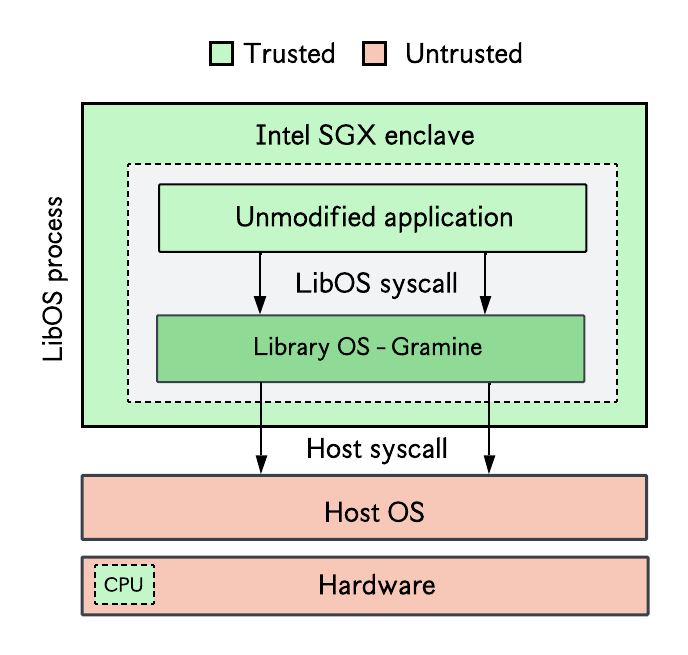
Gramine began as an academic project, based on Graphene-SGX: A Practical Library OS for Unmodified Applications on SGX. Using a library OS like Gramine increases the TCB of your SGX application, but makes deployment simpler.1
You should already have SGX software installed before continuing.
Installing Gramine
On Ubuntu 22.04 or 24.04:
1
2
3
4
5
6
7
8
9
10
sudo curl -fsSLo /etc/apt/keyrings/gramine-keyring-$(lsb_release -sc).gpg https://packages.gramineproject.io/gramine-keyring-$(lsb_release -sc).gpg
echo "deb [arch=amd64 signed-by=/etc/apt/keyrings/gramine-keyring-$(lsb_release -sc).gpg] https://packages.gramineproject.io/ $(lsb_release -sc) main" \
| sudo tee /etc/apt/sources.list.d/gramine.list

sudo curl -fsSLo /etc/apt/keyrings/intel-sgx-deb.asc https://download.01.org/intel-sgx/sgx_repo/ubuntu/intel-sgx-deb.key
echo "deb [arch=amd64 signed-by=/etc/apt/keyrings/intel-sgx-deb.asc] https://download.01.org/intel-sgx/sgx_repo/ubuntu $(lsb_release -sc) main" \
| sudo tee /etc/apt/sources.list.d/intel-sgx.list

sudo apt-get update
sudo apt-get install gramine
For other OSes, see the official Gramine installation documentation.
Generate an enclave signing key. The generated key is stored in $HOME/.config/gramine/enclave-key.pem:
1
gramine-sgx-gen-private-key
Deploying an SGX-protected program with Gramine
Gramine programs are configured with a manifest file. Clone the helloworld example from the Gramine repo to see how this is done:
1
git clone https://github.com/gramineproject/gramine.git && cd gramine/CI-Examples/helloworld
You can build with SGX support (if you have the hardware) or without SGX:
1
2
3
4
5
6
7
# build and run with SGX
make SGX=1
gramine-sgx helloworld

# build and run without SGX
make
gramine-direct helloworld
You can now replace the content of helloworld.c with your own program and test. Check the Gramine GitHub repo for more advanced examples.
Next: the same idea with Occlum, another library OS for SGX.
Other resources
One core challenge in systems security is the constant trade-off (or “tug of war”) between three factors: security, usability, and performance. Improving one often comes at the expense of at least one of the other two. ↩︎